Is there an app that makes a meal plan from what is in my fridge?
Yes, and the ones that do it differ in how they find out what you own: a list you tick, a loyalty card, or a photograph.
Yes, and there are three kinds of them.
Yes. Several apps build meals from food you already have, and they differ in how they learn what that food is: SuperCook asks you to tick ingredients off a list, Cooklist reads your grocery loyalty card, and WhatsCook.ing reads a photograph of your shelf or fridge. That one choice decides everything after it, because an app with the wrong idea of your kitchen will write a week you cannot cook.
They also differ in how much they hand back. Some return a recipe for tonight. Some write seven days and keep count as you cook. Those are different products under one search.
We make one of the three apps named above, so read this as you would any guide written by a competitor. Section five says where our app is the wrong choice.
One: you tick it off a list.
This is SuperCook, and its own description is the plainest sentence in the category: "SuperCook only shows you recipes that require the ingredients you already have." You mark what is in the cupboard and it returns recipes that need nothing else. It is free, Apple lists no in-app purchases, and it holds 4.82 stars from 21,712 ratings.
What it gets wrong is upkeep. The list is only as accurate as the last time you edited it, and a kitchen changes daily. It also returns recipes rather than a week, so there is no plan, no shopping list of gaps, and no nutrition attached.
Two: your loyalty card tells it.
Cooklist describes itself this way: "It connects to your grocery store loyalty cards and automatically downloads all of your food purchases into a digital pantry." It is the pantry-first app here with real scale, at 4.73 stars from 11,292 ratings, with Pro listed from $5.99 to $9.99 a month, or $49.99 or $59.99 a year.
What it gets wrong is the difference between bought and left. A receipt records a shopping trip, not a shelf. It does not know you finished the rice on Tuesday, and it never sees food you paid cash for, were given, or grew.
Three: it reads a photograph.
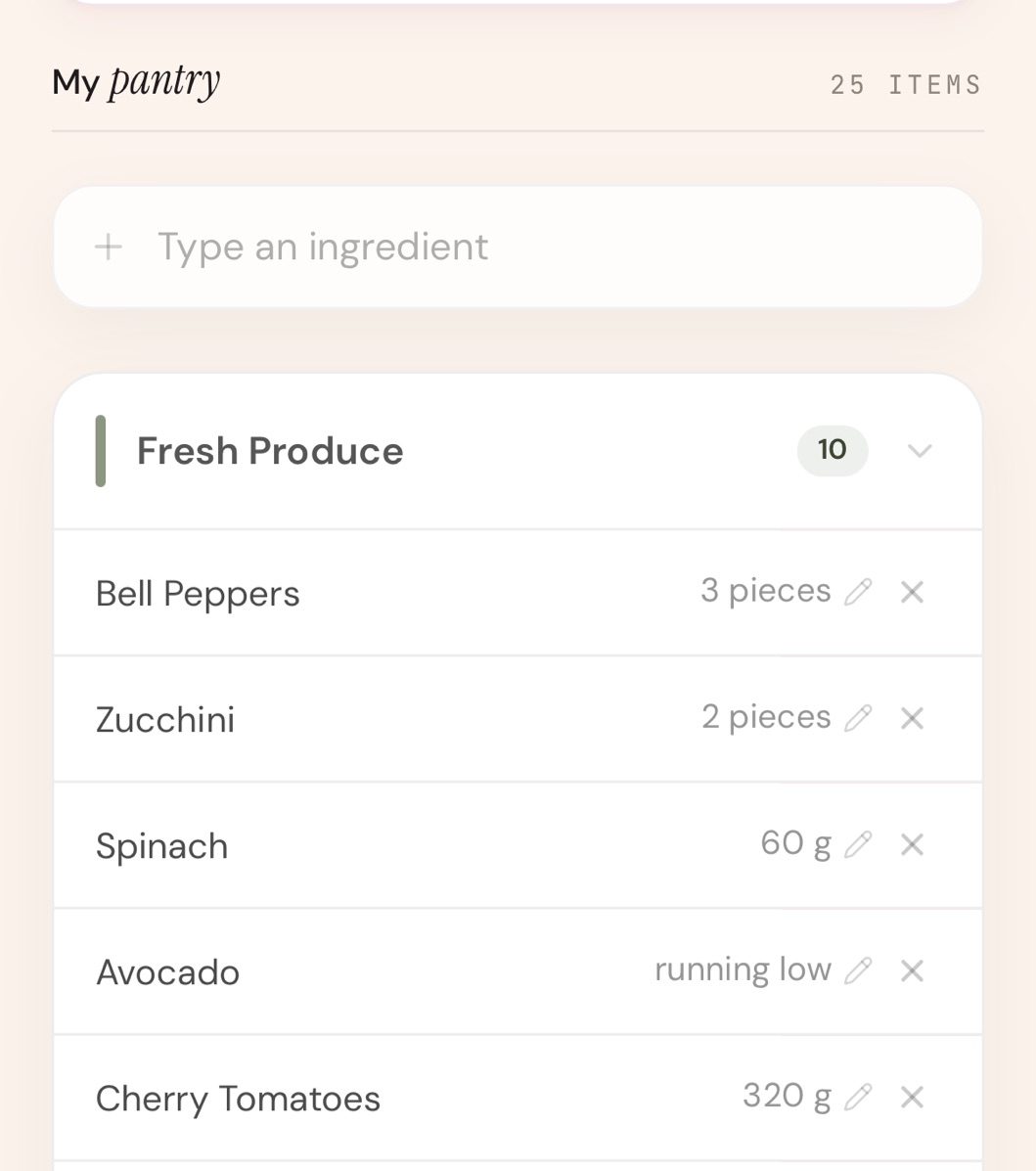
This is what our app does. You photograph the shelf or the fridge, the items and their quantities become a pantry list you can edit, and the week is written around what is there. The shopping list is only what the pantry does not already cover.
What it gets wrong is the frame. A camera sees what you point it at, so the jar at the back and the freezer drawer are missing until you photograph them, and a label read at an angle can come back wrong.
A recipe for tonight is not a plan for the week.
Most searches for this land on ingredient matchers, and for one evening that is often the right tool. Type in what you have, get something to cook, close the app.
A week is a harder job. It has to decide seven days at once, keep the same dish from appearing twice, spread what you own across those days, subtract the pantry from the shopping list, and bring the quantities down as meals get cooked. An app that answers tonight well can be no help on Sunday afternoon.
A quick way to tell which kind you are holding: in a recipe-first planner the shopping list is the whole recipe, because it assumes an empty kitchen. In a pantry-first one the list is the subtraction. If you add your pantry and the list does not get shorter, the pantry is decoration.
Can you correct it, and does the correction stick?
Every method gets things wrong, so the question is what happens next. You should be able to add, edit and delete any item by hand, and anything you added should survive the next import or photo. If a correction is wiped whenever the app refreshes, you will stop correcting it.
Does the count come down as you cook?
A pantry that only ever goes up is a shopping history. Check what happens after you mark a meal cooked: the ingredients it used should be deducted, in roughly the right amount, so next week starts from what is actually left.
Who actually makes it?
This category has a name-confusion problem already. A search for SuperCook also returns SuperCook Track Calorie Recipe, a different app from a different developer with 12 ratings. Read the developer name on the listing and check the rating count, not just the stars.
What happens to your data if the app stops?
Mealime is a well-liked planner at 4.81 stars from 53,992 ratings, and its own closing page says the app "will be discontinued as of October 21, 2026" and that all personal data will be deleted when it shuts down. Worth knowing before you pour a year of recipes into anything. Paprika is the opposite arrangement: $4.99 once, recipes kept on your own devices.
What WhatsCook.ing does, and what it costs.
You answer a questionnaire about diet, goals and body metrics, photograph the shelf, and the app writes a week of recipes around what it found, with a shopping list for the gaps. Cooking a meal logs it, which scores the day across four pillars and moves a BioAge figure. BioAge is a nutrition-derived estimate calculated from the meals you logged, with its method shown in the app. It is not a medical measurement.
It is $29.99 a month or $179.99 a year after a 7-day free trial through your Apple Account, the most expensive price on our own comparison table, and there is no free tier.
And where it is the wrong choice.
It is an iPhone app with no Android or web version, and it is not on the App Store yet, so there is nothing to install today and no ratings to weigh. It does not order groceries, has no barcode scanner, and will not estimate the calories in a photo of a finished plate. The questionnaire is long, and the first plan takes three to four minutes to write.
If you want something free, SuperCook costs nothing, and the core of Samsung Food is free with premium at $6.99 a month. Both are good at what they do. If the deciding and the waste are not costing you anything today, the cheaper apps here are better value than ours.
Five pages that go deeper.
The full table of ten apps sits on the comparison page, including the ones that beat us. For the Mealime shutdown, read what to use now that Mealime is closing or the Mealime alternative page. If you would rather not shop this week, there is planning a week without going to the store. Shorter answers are in the questions page.
Every figure above, and where it came from.
Prices and ratings are what Apple showed on the US App Store on 9 September 2026, and rating counts rise daily. Listings read that day: SuperCook, Cooklist, Mealime, Paprika 3 and Samsung Food.
The lookalike listing, SuperCook Track Calorie Recipe, was read on 21 September 2026. Mealime's closing notice, for the 21 October 2026 date and the deletion of personal data, was read on 14 September 2026 and checked again on 21 September 2026.
On its way to the App Store.
WhatsCook.ing is finishing its App Store submission. Leave your email and we will write once, on the day it is live, and never for anything else.
7-day free trial through your Apple Account, then $29.99 a month or $179.99 a year. iPhone only.