Twenty-five questions, answered plainly.
If yours is not here, write to us and a person answers.
What is WhatsCook.ing?
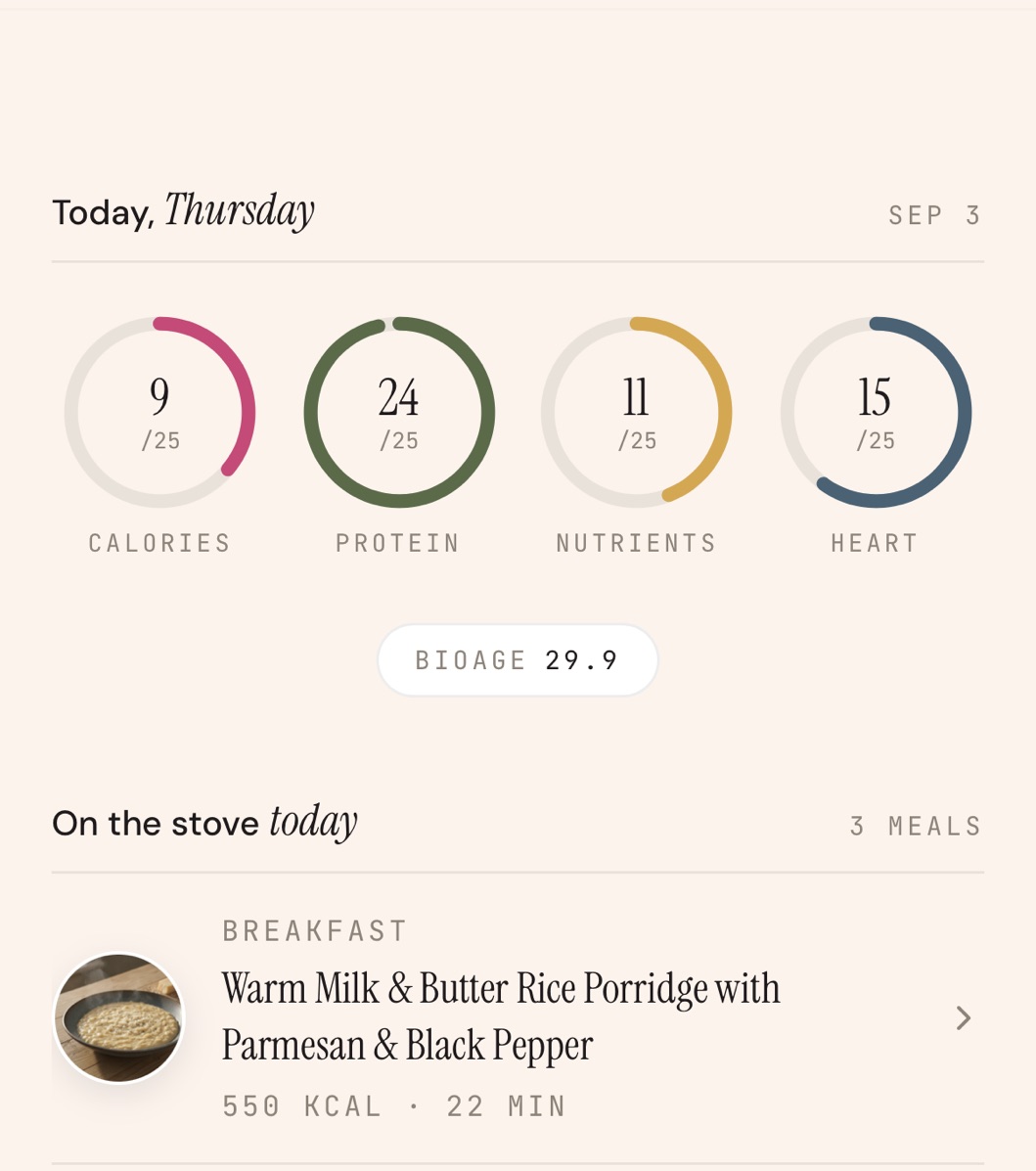
WhatsCook.ing is an AI nutrition coach for iPhone. It plans your week of meals from your goals, your tastes and what is already in your kitchen, walks you through each recipe step by step, and lets you log each meal with one swipe. Every meal you log is read nutrient by nutrient into four pillars, Calories, Protein, Nutrients and Heart, and a BioAge estimate, which is nutrition-derived and not a medical measurement. Your pantry counts itself down as you cook, and your shopping list leads with the foods that close your nutrient gaps, then what is running low and what is in season near you. In the US it opens at Walmart, Instacart, Amazon Fresh and more; anywhere, it copies as a plain list.
Who is WhatsCook.ing for?
People who cook at home most nights and want the week decided, the food they already bought used up, and their nutrition counted without keeping a food diary, on any of the nine diets in the questionnaire. It is the wrong tool if you mostly eat out, want a macro-precise food log with a barcode scanner, or need medical advice.
Is there an app that makes a meal plan from what is in my fridge?
Yes, several do, and they differ in where your food list comes from. SuperCook is free and asks you to tick ingredients from a list, then shows recipes that use them. Cooklist builds a pantry from your grocery loyalty card. WhatsCook.ing reads a photograph of your shelf or fridge, writes a week of recipes around what it finds and around your goals and tastes, tracks the nutrition of every meal you cook, and leads its shopping list with the foods that close your nutrient gaps.
How does it read my pantry?
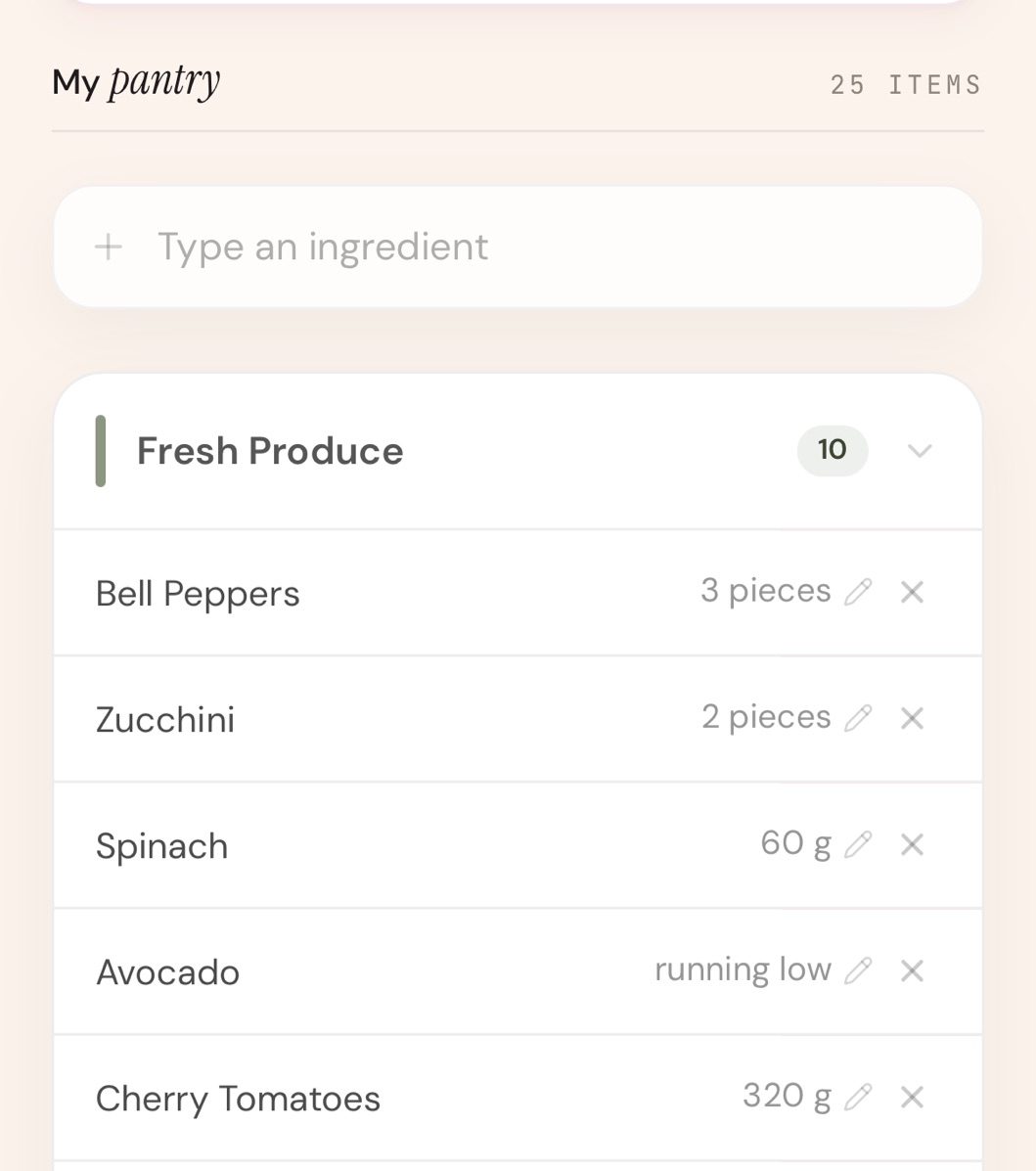
You photograph the shelf or fridge, and Google Gemini returns the items and quantities as a pantry list you can edit. Amounts come down as you cook, so nothing is kept by hand.
What if it reads my shelf wrong?
You correct it. Every item can be added, edited or removed by hand, and anything you added yourself survives the next photo. Add what is missing and the next plan uses it.
Does it work without buying groceries?
Yes. Ask for a week built strictly from what you already own, with nothing added to a shopping list. If the pantry cannot carry seven days, the app says so before it starts rather than inventing ingredients.
What is a pantry-only week and why is it shorter?
It is a week written strictly from the food on your shelf. If a whole food group is missing, the app writes four days instead of seven and tells you before it starts. Four days there is the intended result, not a fault.
Is there an app that makes a shopping list from what is already in my pantry?
Yes. WhatsCook.ing plans the week around what your pantry already holds, so the shopping list skips what you have enough of. It starts with the foods that close your nutrient gaps, then sections for what is running low in your pantry, what your daily routines use up, pantry staples, produce in season near you and recipe essentials for your cuisines. Anything a recipe needs that you do not have is marked To buy on that recipe. Cooklist also keeps a pantry, filled from your grocery loyalty card, and AnyList is a good shared list if the list is all you need.
Which stores does the shopping list work with?
In the US, choose Walmart, Amazon Fresh, Instacart, DoorDash, Target, Kroger or Trader Joe's, and each item on the list opens a search for it on that store's US site. Anywhere, keep a plain list for shopping in person. The whole list can be copied. The app does not place the order: the basket and checkout stay with the store.
Can I swap a meal?
Yes. A swap gives you a different dish with its own photo and macros, still inside your diet and targets. There are five swaps a week, and a rejected dish does not come back that week.
What happens at the end of the week?
The finished week stays on screen and nothing regenerates behind your back. One button plans the next week from the pantry as it is now.
What diets does it support?
The questionnaire covers omnivore, flexitarian, pescatarian, eggitarian, vegetarian, vegan, keto, paleo and low-FODMAP, along with your allergies. Every meal is written to the diet and allergies you set. The app then checks each meal's ingredients against the vegan, vegetarian, eggitarian, pescatarian and keto rules and eight common allergens (dairy, egg, gluten, soy, peanut, tree nut, sesame and shellfish), and sends any meal that fails back to be rewritten. Paleo, low-FODMAP and needs such as grain free, garlic free or no added sugar are written into your plan but are not part of that check. The check matches ingredient names against lists of common allergen foods, so it can miss a hidden source such as the wheat in some sauces; if an allergy or another need is medical for you, check every label yourself. Vegetarian here means plant based plus dairy and no eggs; eggitarian means no meat or seafood, with eggs and dairy allowed.
Does it track micronutrients?
Yes. Every meal you log is read for calories, protein, carbohydrate, fat, fiber, sugar and sodium, and for iron, calcium, vitamin C, vitamin D and omega 3. Vitamin and mineral targets follow NIH recommended intakes for your sex and age, and each recipe's nutrition is worked out from its ingredients, with calories and macros checked against a USDA FoodData Central reference table when the ingredients match. The Nutrient Lens shows where you fall short, and the foods that close those gaps lead the shopping list.
Can I log food that was not on the plan?
Yes. A drink, a snack or a meal out can be logged from a photo or a few typed words, and it counts toward the day. If you ate something else in place of a planned meal, a photo or a sentence replaces it. Daily routines such as supplements can be checked off too. Google Gemini reads the photos and the typed entries, and the app asks before the first one is sent.
Do I have to weigh my food to use this?
No. You never have to keep a food diary: recipes are written for one serving with nutrition computed from the ingredients, so marking a meal as cooked is the whole logging step.
Is BioAge medical?
No. BioAge is an estimate in years, built from your age and the nutrition of the meals you log, across four pillars, Calories, Protein, Nutrients and Heart (calorie fit, protein adequacy, micronutrient coverage and heart health). It is not a diagnosis, not a measurement of your body, and not a substitute for advice from a doctor. The full method opens from How is your BioAge calculated, on Home in the app.
Can an app estimate my biological age from my diet?
Not in a medical sense. WhatsCook.ing shows a BioAge, an estimate in years built from your age and the nutrition of the meals you log, scored across four pillars and smoothed over your history, so it moves with how you eat over weeks. That smoothed score out of 100 sets how far the estimate sits above or below your actual age. It does not test your blood, your DNA or your body, it is not a diagnosis, and it is not a substitute for a doctor. The full method opens from How is your BioAge calculated, on Home in the app.
How much does it cost?
WhatsCook.ing is $29.99 a month or $179.99 a year on the US App Store, billed through your Apple Account; other App Store countries show local prices. Your first 7 days are free when you start a plan through your Apple Account; cancel at least 24 hours before the trial ends and you pay nothing. One membership covers everything, monthly or yearly.
Is there a free version?
No. Your first 7 days are free when you start a plan through your Apple Account, then it is $29.99 a month or $179.99 a year in the US, or the local price in other App Store countries. For something free today, Samsung Food lets you plan your week of meals and turn it into a shopping list, and SuperCook finds recipes from the ingredients you tick; both are free at their core.
Is it on Android or the web?
WhatsCook.ing is an iPhone app, for iOS 15 or later, and there is no Android app. It is on the App Store in the United States, the United Kingdom, Canada, Australia and India, and you can download it today.
What data leaves my phone and who sees it?
Two AI providers read your data. Google Gemini reads the photos you take in the app, of your pantry or of a meal or snack you log, and the food you type in to log or to replace a planned meal; it also draws the recipe pictures and turns the foods you like into a taste profile for your plans. Your answers about diet, goals and body metrics, the city you set, any biomarkers already on your profile, your pantry list, your plan history, the recipes you save and a weekly summary of what you logged beyond your plan go to Anthropic, which writes the week and your shopping suggestions around them, including produce in season near you. To run the service, your account, plans, logs and photos are stored with Google Firebase, Vercel runs the servers that carry your photos, entries and answers to the AI providers, crash reports go to Sentry with identifiers and health fields removed, and your subscription status comes from Apple through RevenueCat. When you type your city in the questionnaire, what you type and your IP address go to OpenStreetMap's public place search, which suggests matching places. The app's typefaces load from Google Fonts and some questionnaire pictures from Unsplash, and both receive your IP address. Nothing is sold and nothing goes to advertising.
Does it use AI and can I say no?
Yes, and the app asks first. The first time anything would go to an AI provider, a sheet says what each one receives and what it is used for, and nothing is sent to them until you tap Continue. The two providers are Google Gemini and Anthropic, and the privacy policy names them with everything each one receives. If you tap Not now, nothing goes to either provider and the action is cancelled; the app asks again the next time you use a feature that needs them. A pantry photo you add while setting up is saved to your account with Google Firebase as soon as you pick it, and Gemini reads it only after you agree. The app remembers an agreement on the iPhone itself, so another account signed in later on the same iPhone is not asked.
How do I cancel?
In the iPhone Settings app, tap your name, tap Subscriptions and choose WhatsCook.ing, or reach the same screen from Profile in the app. Billing is through your Apple Account. To stop the next charge, cancel at least 24 hours before the period ends; access lasts to the end of the period you paid for.
How do I delete my account?
Open Profile in the app and choose Delete account. That removes your sign-in, your meal plans, pantry, logs and BioAge history from our systems, and revokes Sign in with Apple if you used it. If you cannot open the app, write to support@whatscook.ing from the address you signed up with and we will do it for you.
What is a good Mealime alternative now that it is closing?
Mealime's own closing page says the app will be discontinued as of October 21, 2026, and points members to Meals Hub inside the Albertsons Companies store apps, which is free. Samsung Food and SuperCook are also free at their core. WhatsCook.ing, the app we make, is a paid choice if you want the week planned from your goals and your kitchen and the nutrition of what you cook tracked.
There is more on the Mealime alternative page, including where this app is not a like-for-like replacement, and on the best meal planning apps in 2026, which includes the apps that beat us.
Longer answers, one question each.
Is there an app that makes a meal plan from what is in my fridge? How do I plan a week of meals without going to the store? What is the best meal planning app for one person? Which meal planning apps track nutrition, not just recipes? What should I use now that Mealime is shutting down? Which meal plan service gives you a grocery list and does the planning? How do I get a high-protein meal plan with a grocery list? How do I plan a week of dinners in 15 minutes? What is the best AI meal planner app? Is there an app that builds a grocery list from my nutrient gaps? How can you tell if you get enough vitamin D, iron and calcium without keeping a food diary? Can an app estimate your biological age from what you eat? All guides. The best meal planning apps in 2026, compared. The Mealime alternative. What to use now that Yummly is gone. The Cal AI alternative for people who cook at home.
On the App Store now.
Your week of meals planned from your goals, your tastes and your kitchen, every meal read nutrient by nutrient, and a shopping list led by your nutrient gaps.
Download on the App Store7-day free trial through your Apple Account, then $29.99 a month or $179.99 a year on the US App Store; other App Store countries show local prices. iPhone only.