Which meal planning apps track nutrition, not just recipes?
Nutrition means three different things here, depending on whether an app settles your food before you cook it, scores it after you eat it, or never touches it at all.
Three kinds of app wear the same label.
Recipe managers such as Paprika hold and organise recipes but never score what you eat, and trackers such as Cronometer, MyFitnessPal and Cal AI score food after it has been eaten without deciding what you cook. Only a planner that carries nutrition through the plan settles the numbers before you shop: Eat This Much builds the week from your calorie and macro targets, and WhatsCook.ing, which we make, builds it from a photograph of your own pantry and scores the meals you cook. WhatsCook.ing is an iPhone app still finishing its App Store submission, so today Eat This Much is the one you can install.
We make one of the apps below, so read this as you would any comparison written by a competitor. Every figure comes from the App Store listing linked beside it, read on 9 September 2026.
Recipe managers hold the recipes and score nothing.
This group is the most honest about itself. Paprika 3 costs $4.99 once, no subscription, and holds 4.90 stars from 53,706 ratings, the highest in the set we compared. It describes itself plainly: "Organize your recipes. Create grocery lists. Plan your meals." It stores your recipes and lets you place them on a calendar. It does not look in your kitchen and it does not score what you eat.
Samsung Food starts from recipes you save around the web, is free at its core with premium at $6.99 a month, and holds 4.78 from 6,333 ratings. Mealime plans from its own library at 4.81 from 53,992 ratings, but its closing page says it "will be discontinued as of October 21, 2026", so it is not the app to move to now. SuperCook is free with no in-app purchases listed and finds recipes from ingredients you tick off a list, which is a search rather than a week, with no nutrition attached.
If the real question is where to keep your recipes, this group answers it well and cheaply. If it is whether you are eating well, none of them will tell you.
Trackers score the food after you have eaten it.
These are the apps most people mean by nutrition apps, and they hold the most precise numbers in the category. Cronometer describes itself as designed for accuracy, holds 4.77 stars from 97,718 ratings, and charges $10.99 a month or $59.99 a year for Gold. For micronutrients to a decimal place, that is the tool. MyFitnessPal is the incumbent at 4.7 stars from 2,356,014 ratings, and it is a food log rather than a planner. Cal AI photographs the meal you already ate and returns a breakdown, free to download with in-app purchases Apple lists from $0.99 to $29.99, at 4.80 from 361,529 ratings.
ZOE sits at the edge of this group. Our comparison page files it here rather than with the planners, because nothing is planned for you: it scores the meals you log, guided by its own biology tests. It is free to download with in-app purchases Apple lists at $15.99 and $99.99, at 4.77 stars from 6,965 ratings.
The limit of the whole group is one sentence: they tell you what you ate, not what to cook, and none of them knows what is in your kitchen.
Their strength is where we lose. A tracker counts a restaurant meal, a packet of biscuits, a protein bar. WhatsCook.ing has no barcode scanner and no photo estimate for a finished plate, so if most of your food is bought rather than cooked, one of these is the right tool and this one is not.
Planners that carry nutrition all the way through the week.
This is the small group, and the only one where the nutrition is settled before you shop rather than after you eat. Eat This Much does it from numbers: you give it your calorie and macro targets, a budget and a schedule, and it generates a complete plan against them. It holds 4.72 stars from 22,087 ratings, with in-app tiers Apple lists from $8.99 to $84.99, and it has a virtual pantry feature too, the closest app in our comparison to a planner that also looks at what you own.
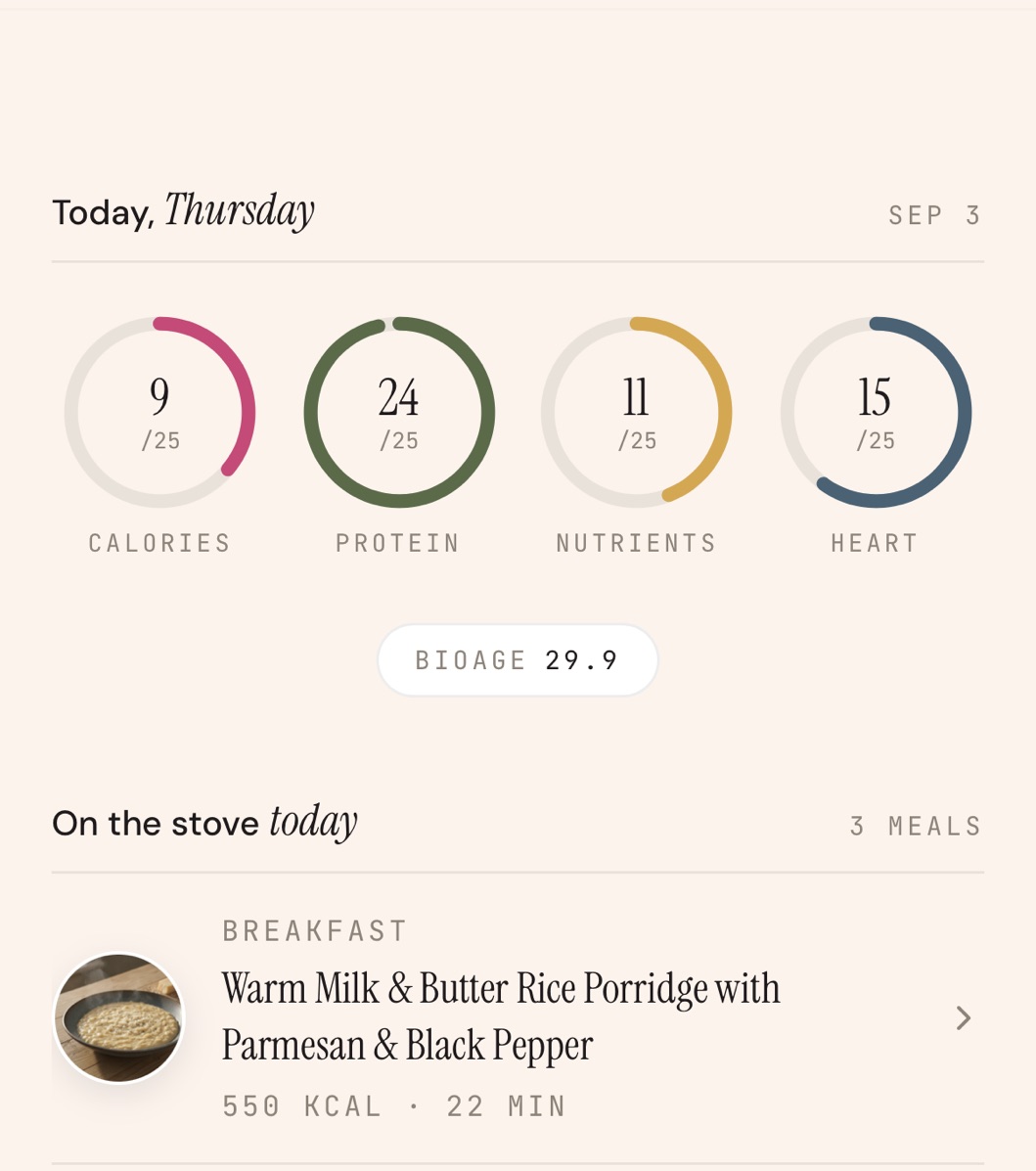
WhatsCook.ing does it from your shelf. You photograph the cupboard or the fridge, the app reads the items and their quantities, and writes seven days around what is there. What the week needs and the pantry does not cover becomes the shopping list, so the list is the subtraction rather than the whole recipe. Marking a meal cooked is the entire logging step: no food diary, nothing to weigh, because each recipe's nutrition is computed from its own ingredients.
That cooked meal scores the day across four pillars, calorie fit, protein adequacy, micronutrient coverage and heart health, each out of 25 points, and those scores move a BioAge estimate. BioAge is a nutrition-derived estimate built only from the meals you cooked and logged, with its method shown inside the app rather than kept as a secret number. It is not a medical measurement, not a diagnosis, and not a substitute for advice from a doctor.
Four reasons to pick something else.
Price. WhatsCook.ing is $29.99 a month or $179.99 a year, after a 7-day free trial through your Apple Account. That is the most expensive line on our comparison table, against Paprika at $4.99 once and Samsung Food free, and there is no free tier here at all.
Platform. It is an iPhone app, with no Android and no web version, and it is still finishing its App Store submission, so there is nothing to install today and no ratings to weigh against Cronometer's or Cal AI's.
Scope. No grocery ordering, no barcode scanner, no calorie estimate from a photo of a finished plate. It scores what you cooked from its own recipes, a narrower job than a tracker.
Effort at the start. The questionnaire is long, because diet, allergies, goals and body metrics all feed the targets, and the first plan takes three to four minutes.
Match the app to the job, not to the word.
To keep and cook your own recipes, and score nothing, pick Paprika, or Samsung Food if you would rather pay nothing. For exact numbers on everything you eat, including food you did not cook, pick Cronometer, or Cal AI if photographing the plate is the only logging you will keep up. For a plan built to macro targets, pick Eat This Much. For a week written from the food on your shelf, with the list as the gaps and one number that moves with what you cooked, that is what we built.
One test settles most of it. Ask where the nutrition arrives: before the shop, or after the meal. Both are useful. Only one changes what you buy.
Read next: the best meal planning apps in 2026, ten apps in one table; an app that plans from what is in my fridge; the best meal planning app for one person; and the questions people ask, including how BioAge is calculated.
Every figure above, and where it came from.
Prices, star ratings and rating counts are the figures Apple showed on the US App Store on 9 September 2026, and every listing was opened again on 21 September 2026. Rating counts rise daily, so read them as a snapshot. Prices are the tiers Apple lists, not necessarily the one you will be offered.
App Store listings, read 9 September 2026: Paprika Recipe Manager 3, Samsung Food, Meal Planner, Mealime Meal Plans and Recipes, SuperCook, Recipe By Ingredient, Cronometer, Calorie Counter, MyFitnessPal, Calorie Counter, Cal AI, Calorie Tracker, ZOE Health, AI Meal Tracker and Eat This Much, Meal Planner.
Mealime's closing date and the statement that personal data is deleted at shutdown come from mealime.com/closing, read 14 September 2026 and checked again 21 September 2026. Our longer page on that is the Mealime alternative page.
On its way to the App Store.
WhatsCook.ing is finishing its App Store submission. Leave your email and we will write once, on the day it is live, and never for anything else.
7-day free trial through your Apple Account, then $29.99 a month or $179.99 a year. iPhone only.