What is a good Cal AI alternative if you cook at home?
A photo is the fastest way to log a meal someone else made. When you made it yourself, the recipe already holds the numbers.
Pick by where your food comes from.
It depends on who made the meal. Cal AI estimates a meal from a photo, a barcode or a few words. Cronometer is the precise option if you log each food against its database. WhatsCook.ing plans your week, so a meal you cook from the plan logs with one tap, its nutrition worked out from the recipe's ingredients; anything else logs from a photo or a few typed words. iPhone, $29.99 a month on the US App Store.
We make WhatsCook.ing, so read this as a competitor's guide. Section five says where ours is the wrong pick.
Cal AI is fast, and very well liked.
Cal AI's App Store listing sums it up in three steps: answer lifestyle questions to build your plan, "snap a photo of your meal", and get your nutritional breakdown. Its site adds a barcode scan and describing a meal in words, and reports calories, protein, carbs and fat. It holds 4.8 stars from more than 368,000 ratings on the US App Store, and it is on Android as well as iPhone.
It is free to download, but its listing says food scanning results require a subscription, with in-app purchases Apple lists from $0.99 to $29.99. For a lunch you bought, a restaurant meal or a packet of something, a photo or a barcode is hard to beat.
A recipe already knows what went in.
A photo has to judge two things it cannot fully see: how much is on the plate, and what is hidden in it, like the oil in the pan or the butter in the sauce. When you cook from a recipe, both were written down before you started.
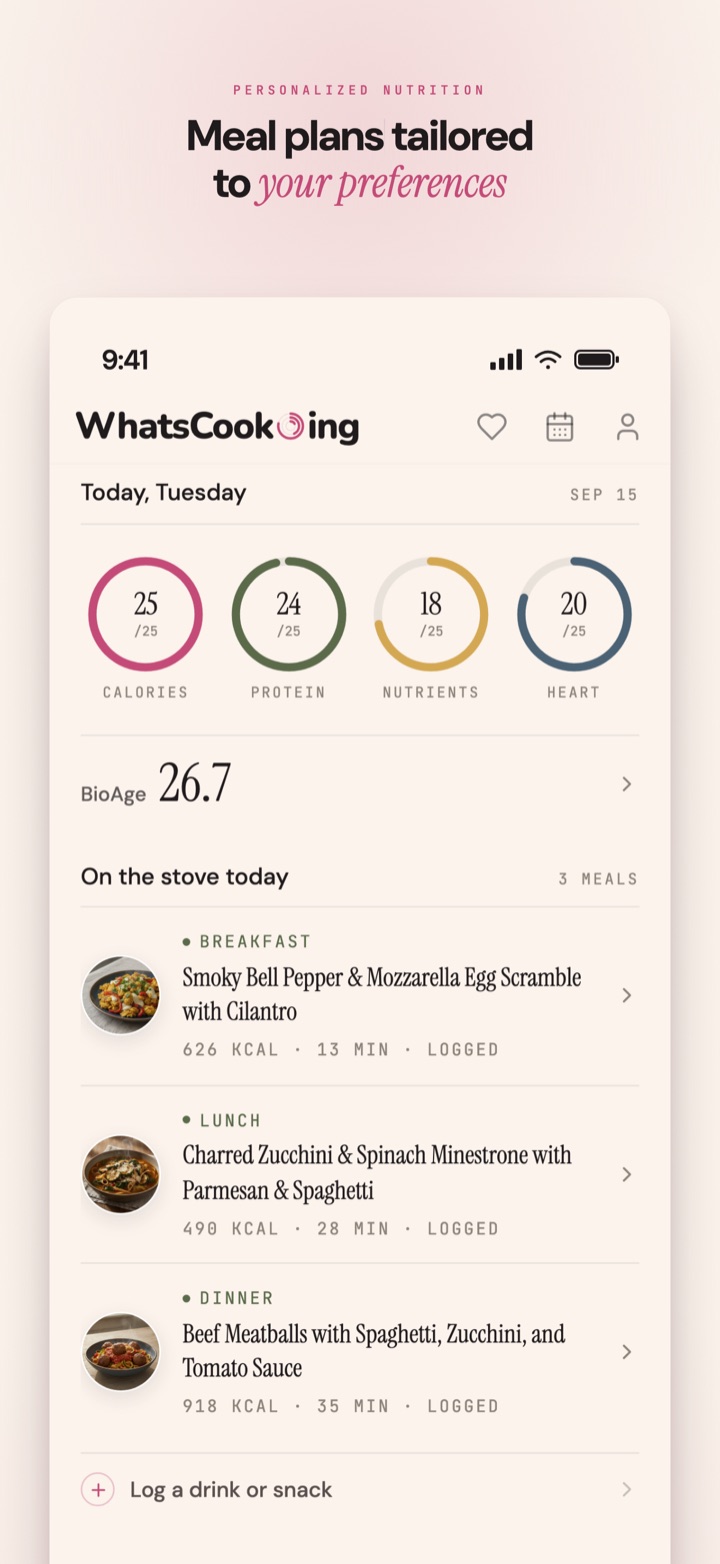
That is the idea behind WhatsCook.ing. It writes a week of meals from your goals, your tastes and what is in your kitchen, and each recipe's nutrition is worked out from its ingredients. When at least half of a recipe's ingredients match the app's USDA FoodData Central reference table, its calories and macros are checked against it, and any figure more than a quarter off is corrected.
When you cook a planned meal, one tap logs it, from the meal itself or with a swipe on Home. Anything else, a drink, a snack or a meal out, logs from a photo or a few typed words. So photos still have a place; they are just not the only way in.

Four apps, side by side.
The table scrolls sideways on a phone.
| App | How a meal gets logged | Plans your meals | What it reports | Price on the US App Store |
|---|---|---|---|---|
| Cal AI | A photo, a barcode or a description | A plan from lifestyle questions; meal planning is not listed | Calories, protein, carbs and fat | Free download; scan results need a subscription. In-app purchases from $0.99 to $29.99 |
| Cronometer | Search a database of 1.1 million verified foods, a free barcode scan, or photo and voice logging, listed with Gold | Not listed | Calories, macros and 95+ vitamins and minerals | Free. Gold $10.99 a month or $59.99 a year |
| MyFitnessPal | Search or saved meals; barcode scan, meal scan and voice logging with Premium | With Premium Plus | Calories, macros and nutrition goals | Free download. Premium and Premium Plus in-app |
| WhatsCook.ing | One tap for a planned meal you cooked; a photo or a few words for anything else | Yes, a week from your goals, tastes and kitchen | Calories, protein, carbohydrate, fat, fiber, sugar, sodium, iron, calcium, vitamin C, vitamin D and omega 3 | $29.99 a month or $179.99 a year, after a 7-day free trial |
What WhatsCook.ing does, and what it costs.
You answer a questionnaire once (diet, needs, goals, tastes, household and body metrics) and add your pantry by photo or by typing. The app writes a week of meals, with a picture for every recipe. Every logged meal is read for calories, protein and ten other nutrients, scored across four pillars and folded into BioAge, an estimate in years built from your age and the nutrition of the meals you log. BioAge is a nutrition-derived estimate, not a medical measurement. The shopping list leads with the foods that close your nutrient gaps.
It is $29.99 a month or $179.99 a year on the US App Store, after a 7-day free trial through your Apple Account. Cancel at least 24 hours before the trial ends and you pay nothing.
Where it is the wrong pick.
- Most of your food is bought, not cooked. Cal AI, Cronometer or MyFitnessPal will log a takeaway, a sandwich or a protein bar more quickly.
- You want a barcode scanner. WhatsCook.ing has none, and it does not import your own recipes.
- You use Android. It is an iPhone app; Cal AI runs on both.
- You want every nutrient to a decimal. Cronometer reports 95+ vitamins and minerals, for less money.
How accurate is a calorie estimate from a photo?
It is an estimate. A photo shows the surface of a plate, so an app has to judge the portion and cannot see everything inside, such as the oil in the pan or the butter in a sauce. Cal AI says on its site that it uses the phone's depth sensor to judge food volume. If you need precise numbers, weigh your food and log it against a database such as Cronometer's. If you cooked from a recipe, the amounts were written down before you started.
Does WhatsCook.ing log food from a photo?
Yes. A drink, a snack or a meal out logs from a photo or a few typed words, and a photo or a sentence also replaces a planned meal you did not eat. A planned meal you cooked logs with one tap. The first time anything would go to an AI provider, a sheet names both providers and asks before either receives anything.
Is there a free alternative to Cal AI?
Cronometer is free to download, scans barcodes for free and logs against a database of more than 1.1 million verified foods; its photo and voice logging is listed with Gold, at $10.99 a month or $59.99 a year on the US App Store. MyFitnessPal is also free to download, with barcode and meal scan in its Premium tier. WhatsCook.ing has no free tier: it starts with a 7-day free trial through your Apple Account.
Does WhatsCook.ing have a barcode scanner?
No. It is built around meals you cook, so it has no barcode scanner and does not import recipes. For packaged food, Cal AI, Cronometer and MyFitnessPal all scan barcodes.
Does it work in the UK, Canada or Australia?
Yes. WhatsCook.ing is on the App Store in the US, the UK, Canada, Australia and India, at local prices: GBP 29.99 a month or GBP 179.99 a year in the UK, CAD 39.99 or CAD 249.99 in Canada, and AUD 49.99 or AUD 299.99 in Australia. The shopping list opens at US store sites only; anywhere else you copy it as a plain list.
Three pages that go deeper.
Recipe managers, trackers and planners in one guide: which meal planning apps track nutrition. For vitamins and minerals, how to track iron, calcium and vitamin D without a food diary. And ten apps in one table on the comparison page.
Every figure above, and where it came from.
Ratings, prices and features are what Apple showed on the US App Store on 5 October 2026: Cal AI, Cronometer, MyFitnessPal and WhatsCook.ing. Cal AI's barcode scan, typed descriptions, depth sensor and Android app are from its site, read the same day. Prices at checkout are what you pay, so check them there.
On the App Store now.
Your week of meals planned from your goals, your tastes and your kitchen, one tap to log a meal you cooked, and a shopping list led by your nutrient gaps.
Download on the App Store7-day free trial through your Apple Account, then $29.99 a month or $179.99 a year on the US App Store; other App Store countries show local prices. iPhone only.